
NEAR Smart Contracts · 4 min read
Access Keys and Function-Call Keys
Full-access keys versus function-call keys: allowances, receiver_id, method names, and when a dApp should add a limited key.
Access Keys
A NEAR account holds a list of public keys. Each key has a permission:
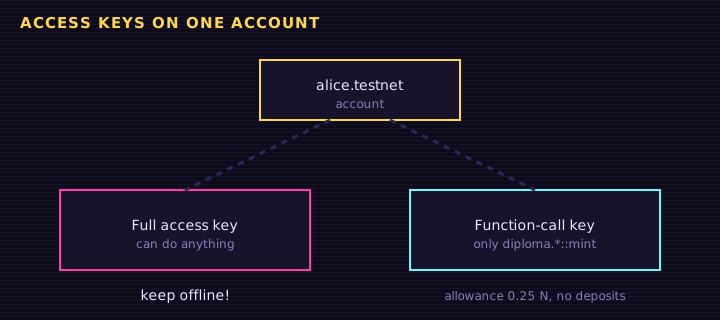
- Full access: can do everything: transfer NEAR, deploy code, add or delete keys, delete the account.
- Function call: can only call non-payable methods on one contract, optionally a short list of method names, and spend gas from a small allowance.
Why function-call keys matter
When you sign in to a dApp, your wallet can add a function-call key for that dApp's contract. The dApp keeps the private half in your browser and signs routine actions (like "post a message") without a pop-up. It still cannot move your NEAR, because that key is not allowed to attach a deposit.
bash
# list the keys on an account with near-cli-rs
near account list-keys retr0school.testnet network-config testnet nowKeys are rotatable
Lost a laptop? Use another full-access key to delete the old one. Because your identity is the account name, rotating keys does not change your address, your tokens, or your diplomas.
Try it: read an account's keys
<h1>Access keys</h1>
<input id="acc" value="retr0school.testnet">
<button id="go">List keys</button>
<pre id="out">Press List keys.</pre>
Edit this example in the Playground.
Function-call keys in practice
Every NEAR account has a list of access keys. A key is an ed25519 public key plus a permission. There are only two kinds.
Full-access keys
A full-access key can do anything the account can do: send NEAR, add or delete keys, deploy a contract, or call any method with any deposit. Treat it like a seed phrase. The key in MyNearWallet or Meteor is usually full-access.
Function-call keys
A function-call key is limited:
receiver_id— the only contract it can callmethod_names— an allow-list, or empty to allow every method on that contractallowance— a cap, in yoctoNEAR, on what the key may spend on gas. It cannot attach a deposit greater than 0 (so it cannot move the account’s NEAR or paystorage_deposit/ft_transfer’s 1 yoctoNEAR)
That last point is why NEP-141 and NEP-171 require 1 yoctoNEAR on transfers: a leaked function-call key cannot drain tokens.
bash
# near-cli-rs, testnet
near account add-key alice.testnet grant-function-call \
  --contract-account-id hello.near-examples.testnet \
  --allowance '0.25 NEAR' \
  --method-names 'set_greeting' \
  network-config testnet
In near-api-js (current API):
js
await account.addFunctionCallAccessKey({
  publicKey: fnKeyPair.getPublicKey(),
  contractId: "hello.near-examples.testnet",
  methodNames: ["set_greeting"],
  allowance: "250000000000000000000000", // 0.25 NEAR, or omit for no cap
});
What dApps should do
At login, a well-behaved app adds a function-call key scoped to its contract and the methods it needs. Later view-and-change calls that attach 0 deposit can be signed without opening the wallet every time. Payable calls (mint, transfer, storage deposit) still need the full-access key in the wallet.
Never ask a user to paste a full-access private key into a web app. If you are writing a CLI or a test, keep keys in the system keychain or a local file that is not committed.
Exercise
Explain why ft_transfer requires 1 yoctoNEAR in terms of function-call keys. Then list the three limits you would set on a key for a greeting dApp.
Saved in this browser.