
Build a NEAR dApp · 2 min read
Connect a Wallet
Connect a wallet, read state with near-api-js, and send a function call. Official docs now recommend NEAR Connect; Wallet Selector is deprecated for new apps.
Frontend dApp with near-api-js
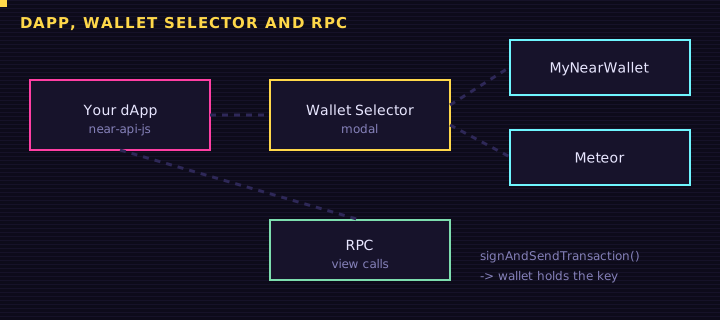
A NEAR frontend does two jobs: view calls over RPC (free, no wallet) and change calls the user signs. The RPC library is near-api-js. For wallets, docs.near.org now tells you not to start a new app on @near-wallet-selector/* — that stack is deprecated and unmaintained. Use @hot-labs/near-connect instead.
This academy’s diploma button still uses Wallet Selector because it was built against that stack. New work should follow the official connector.
Install and connect
bash
npm install @hot-labs/near-connect near-api-jsjs
import { NearConnector } from "@hot-labs/near-connect";
import { JsonRpcProvider } from "near-api-js";

const connector = new NearConnector({ network: "testnet" });
const provider = new JsonRpcProvider({ url: "https://test.rpc.fastnear.com" });

// Connect (opens the wallet UI)
await connector.connect();
const wallet = await connector.wallet();
const accountId = await wallet.getAddress();
View calls
NEAR Connect does not wrap view methods. Call the provider directly:
js
const greeting = await provider.callFunction({
  contractId: "hello.near-examples.testnet",
  method: "get_greeting",
  args: {},
});
Plain fetch to https://rpc.testnet.fastnear.com with query / call_function also works — that is what the Playground examples in these lessons use.
Change calls
js
const result = await wallet.signAndSendTransaction({
  receiverId: "hello.near-examples.testnet",
  actions: [
    {
      type: "FunctionCall",
      params: {
        methodName: "set_greeting",
        args: { greeting: "Hello from Retr0 Academy" },
        gas: "30000000000000", // 30 Tgas
        deposit: "0",
      },
    },
  ],
});
Attach a deposit as a yoctoNEAR string when the method is payable ("10000000000000000000000" is 0.01 NEAR). Budget 30–100 Tgas for simple calls; cross-contract work needs more.
If you still see Wallet Selector
Older tutorials look like setupWalletSelector({ network: "testnet", modules: [...] }) plus setupModal. That is the API this site uses for minting. Do not copy it into a new project. If you are maintaining an existing app, plan a move to NEAR Connect; the official “Your First Web3 App” guide already uses it with a function-call-key plugin for zero-deposit methods.
<h1>near-api-js style view call</h1>
<input id="contract" value="hello.near-examples.testnet" aria-label="Contract id" />
<button type="button" id="go">Read greeting</button>
<pre id="out">Press the button. Change calls need a wallet; views do not.</pre>
Edit this example in the Playground.
Exercise
From memory, write the two imports and the NearConnector({ network: "testnet" }) setup. Then write a provider.callFunction snippet that reads get_greeting from hello.near-examples.testnet.
Saved in this browser.