
Web3 Fundamentals · 6 min read
Wallets, Keys, and Staying Safe
How public keys, private keys, and seed phrases work, plus the safety rules every Web3 developer has to follow.
In Web3, you do not have a username and password stored by a company. You have a key pair, and a wallet is the app that manages it.
Public and private keys
- Private key: a secret, randomly generated 256-bit number. It proves you own your account and lets you sign transactions. Whoever has it controls your funds.
- Public key: mathematically derived from the private key. It is safe to share.
- Account: on NEAR you share a readable account id like
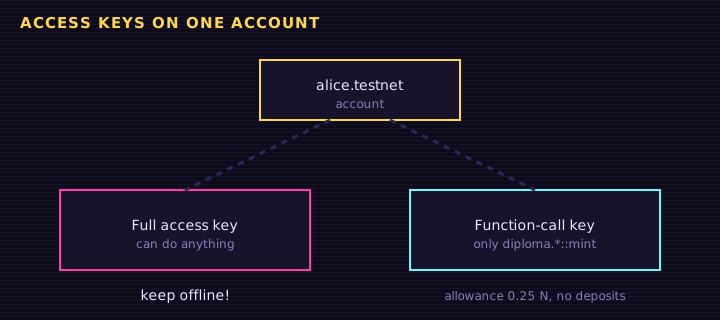
alice.testnet. The account stores which public keys may act for it. (An implicit account is simply the 64-hex form of a public key, before you give it a name.)
The math works one way: it is easy to go from private key to public key, but practically impossible to go back. NEAR uses ed25519 keys, written as ed25519: plus base58.
bash
Private key  ──►  Public key (ed25519:…)  ──►  added to account  alice.testnet
(secret) (public) (share freely)Seed phrases
Most wallets generate a seed phrase (also called a recovery or secret recovery phrase): 12 or 24 ordinary words, like ocean ladder spoon .... These words can regenerate all of your private keys. If you lose your device, the seed phrase restores your wallet anywhere.
Types of wallets
| Type | Examples | Pros | Cons |
|---|---|---|---|
| Web wallet | MyNearWallet | Nothing to install, works on testnet | Keys live in that site's browser storage |
| Browser extension | Meteor, Sender | Easy to use with dApps | Lives on an internet-connected computer |
| Mobile / Telegram | HOT Wallet, Meteor mobile | Convenient, QR codes | Phone loss or malware risk |
| Hardware | Ledger (NEAR app) | Keys never leave the device | Costs money, less convenient |
| Custodial | Exchange accounts | Password reset possible | The company holds your keys ("not your keys, not your coins") |
| Multisig / DAO | Sputnik DAO, multisig contracts | Several approvals, recovery options | More complex setup |
Signing
When you send a transaction or log in to a dApp, your wallet asks you to sign a message with your private key. The signature proves you approved it, without revealing the key.
There are two kinds of requests:
- Transaction signing: changes something on-chain (sends tokens, calls a contract). Costs gas.
- Message signing: proves you own an account without a transaction. On NEAR this is NEP-413
signMessage. It is free. Retr0 Academy uses it to unlock Advanced NEAR for certificate holders.
Safety checklist
- Bookmark the real sites you use and only connect through those bookmarks. Scam sites copy real ones and use look-alike domain names.
- Ignore unexpected direct messages offering help, airdrops, or prizes.
- Use NEAR testnet while learning: create a free
…testnetaccount in MyNearWallet or Meteor, and top it up from the testnet faucet. Test NEAR has no value, so mistakes cost nothing. - Review your account's access keys now and then (in your wallet or on NearBlocks) and delete keys for apps you no longer use.
- Keep your wallet app and browser updated.
- If an offer sounds too good to be true, it is.
Try it: is this a valid NEAR account id?
NEAR account ids are 2 to 64 characters of lowercase letters, digits, and - or _ separators, split into parts by dots, like alice.testnet or app.alice.near. A 64-character hex string is an implicit account. This checker validates the format only. It does not prove the account exists.
<label for="acct">Account id:</label><br>
<input id="acct" size="40" value="alice.testnet">
<p id="result"></p>
<p class="hint">Try: Alice.testnet, a..b.near, x, 98793cd91a3f870fb126f66285808c7e094afcfc4eda8a970f6648cdf0dbd6de</p>
Edit this example in the Playground.
Summary
- Your private key (and the seed phrase that generates it) controls your assets. Never share it.
- Your account id is public and safe to share for receiving NEAR.
- Wallets manage keys and sign transactions and messages.
- Read every signature request, use testnets while learning, and beware of scams.
Exercise
List three things you must never do with a seed phrase. Then open a testnet wallet (MyNearWallet or Meteor) and write down your new testnet account id — you will use it later in this path.
Saved in this browser.