
Advanced JavaScript · 3 min read
DOM Events and UI Patterns
Capture and bubble, event delegation, custom events, debounce and throttle, and rendering lists safely.
How an event travels
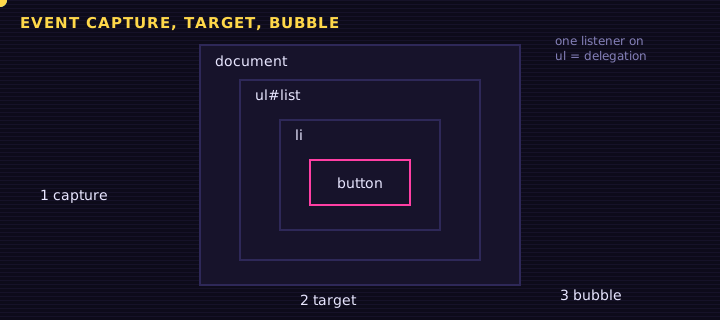
A click on a button inside a list fires in three phases: capture (from window down to the target), target, and bubble (back up). addEventListener(type, fn) listens in the bubble phase by default; pass { capture: true } for the capture phase.
| Method / option | Effect |
|---|---|
event.stopPropagation() | Stops the event travelling further |
event.preventDefault() | Cancels the default action (form submit, link navigation) |
{ once: true } | Removes the listener after the first call |
{ passive: true } | Promises not to call preventDefault, so scrolling stays smooth |
event.target vs event.currentTarget | Element that was clicked vs element the listener is on |
Event delegation
Instead of one listener per item, put one listener on the parent and inspect event.target.closest(...). It works for items added later, too.
<form id="add"><input id="txt" placeholder="New task (try <img src=x onerror=alert(1)>)" required><button>Add</button></form>
<ul id="list"></ul>
<p id="status"></p>
Edit this example in the Playground.
Debounce and throttle
Search boxes and resize handlers fire many times per second.
js
function debounce(fn, ms) {
  let id;
  return (...args) => {
    clearTimeout(id);
    id = setTimeout(() => fn(...args), ms);
  };
}
searchInput.addEventListener("input", debounce((e) => search(e.target.value), 250));- Debounce: run once the events stop for
ms(search-as-you-type). - Throttle: run at most once every
ms(scroll position, drag).
Notice that debounce only works because of a closure over id. That is the next lesson.
Summary
Know the three phases, delegate from a parent with closest(), communicate between components with CustomEvent, debounce noisy inputs, and render user data with textContent.
Saved in this browser.