
HTML · 2 min read
Semantic HTML and Page Layout
Use meaningful elements like header, nav, main, article, and footer to structure a real page.
Semantic means "having meaning". Semantic HTML uses elements that describe their content, instead of generic boxes.
Compare these two snippets:
html
<!-- Not semantic: what is each div for? -->
<div class="top">...</div>
<div class="menu">...</div>
<div class="content">...</div>

<!-- Semantic: the purpose is clear -->
<header>...</header>
<nav>...</nav>
<main>...</main>
Both look the same without CSS, but the semantic version helps screen readers, search engines, and other developers (including future you).
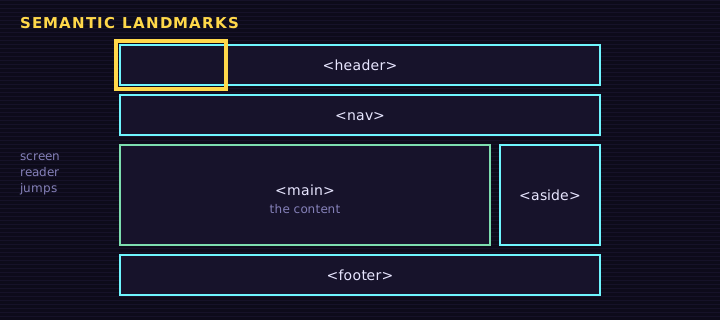
The main layout elements
| Element | Purpose |
|---|---|
<header> | Introductory content: logo, site title, sometimes navigation |
<nav> | A block of main navigation links |
<main> | The main, unique content of the page (only one per page) |
<article> | Self-contained content that makes sense alone: a blog post, news story, product card |
<section> | A themed group of content, usually with a heading |
<aside> | Side content related to the main content: sidebars, tips |
<footer> | Closing content: copyright, contact links |
A typical page outline:
html
<body>
<header>
<h1>Retr0 Academy Blog</h1>
<nav>
<a href="/">Home</a>
<a href="/lessons">Lessons</a>
</nav>
</header>
<main>
<article>
<h2>Why semantic HTML matters</h2>
<p>Published <time datetime="2026-10-28">October 28, 2026</time></p>
<p>...</p>
</article>
<aside>
<h3>Related lessons</h3>
</aside>
</main>
<footer>
<p>© 2026 Retr0 Academy</p>
</footer>
</body><header>
<h1>My Portfolio</h1>
<nav><a href="#work">Work</a> <a href="#about">About</a></nav>
</header>
<main>
<section id="work">
<h2>Work</h2>
<article>
<h3>Weather App</h3>
<p>A small app that shows the forecast.</p>
</article>
</section>
<aside>Tip: hover over each colored box.</aside>
</main>
<footer>Made with HTML</footer>Edit this example in the Playground.
The colored outlines show how each semantic element is a box in the layout.
div and span
<div> (a block) and <span> (inline) are generic containers with no meaning. They are still useful, mainly as hooks for CSS when no semantic element fits.
html
<div class="card-grid">...</div>
<p>Total: <span class="price">$20</span></p>Other useful semantic elements
<time datetime="2026-10-28">for dates and times<address>for contact info<details>and<summary>for a built-in expandable section
HTML
<details>
<summary>What is semantic HTML?</summary>
<p>HTML that uses elements describing their meaning, like nav, article and footer.</p>
</details>
Edit this example in the Playground.
The head: metadata for the page
Semantics also apply to the <head>. These tags help browsers, phones, and search engines:
html
<head>
  <meta charset="UTF-8">
  <meta name="viewport" content="width=device-width, initial-scale=1.0">
  <meta name="description" content="Free beginner lessons for HTML, CSS and JavaScript.">
  <title>Retr0 Academy | Learn to code</title>
  <link rel="stylesheet" href="styles.css">
</head>Summary
- Semantic elements describe their content:
header,nav,main,article,section,aside,footer. - Use one
<main>per page. - Use
divandspanonly when no meaningful element fits. - Good metadata in the
<head>helps search engines and mobile devices.
Saved in this browser.