
JavaScript · 2 min read
Functions
Package reusable code into functions, pass in parameters, return results, and understand scope.
A function is a reusable block of code. Write it once, then call it as many times as you like.
Declaring and calling
js
function greet(name) {
  return "Hello, " + name + "!";
}

greet("Ada");    // "Hello, Ada!"
greet("Grace"); // "Hello, Grace!"nameis a parameter: a placeholder for input."Ada"is an argument: the actual value passed in.returnsends a value back and ends the function.
Default parameters
js
function greet(name = "friend") {
  return "Hello, " + name + "!";
}
greet(); // "Hello, friend!"
Function expressions and arrow functions
Functions are values, so you can store them in variables:
js
// Function expression
const square = function (n) {
  return n * n;
};

// Arrow function: shorter syntax
const cube = (n) => {
  return n * n * n;
};

// Arrow with a single expression: return is implied
const double = (n) => n * 2;

double(21); // 42
Scope
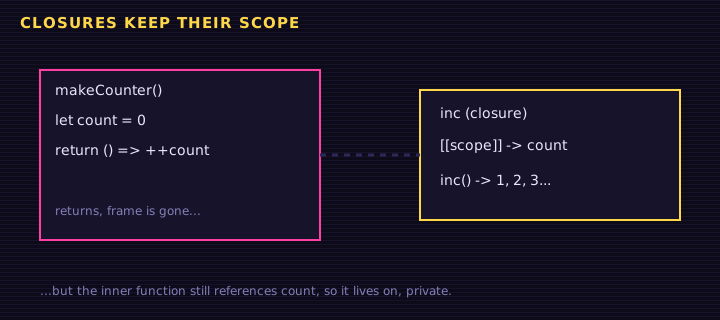
Variables declared inside a function (or any block with curly braces) only exist inside it. This is called scope.
js
const site = "Retr0 Academy";   // global: visible everywhere

function showLesson() {
  const lesson = "Functions";   // local: only inside showLesson
  console.log(site, lesson);    // works
}

showLesson();
// console.log(lesson); // ❌ ReferenceError: lesson is not definedFunctions as arguments (callbacks)
You can pass a function into another function. The passed function is called a callback:
js
function repeat(times, action) {
  for (let i = 0; i < times; i++) {
    action(i);
  }
}

repeat(3, (i) => console.log("Round", i + 1));
You already used a callback: button.addEventListener("click", function () { ... }).
Try it: a tip calculator
<label>Bill: <input id="bill" type="number" value="48"></label><br>
<label>Tip %: <input id="tip" type="number" value="15"></label><br>
<label>People: <input id="people" type="number" value="2" min="1"></label><br>
<button id="calc">Calculate</button>
<p id="out"></p>
Edit this example in the Playground.
Each function does one small job, and they combine to solve the bigger problem. That is good program design.
Summary
- Define functions with
function name(params) { }or arrow syntax(params) => .... returnsends a value back to the caller.- Parameters can have defaults.
- Variables are scoped to the block or function where they are declared.
- Functions can be passed to other functions as callbacks.
Saved in this browser.